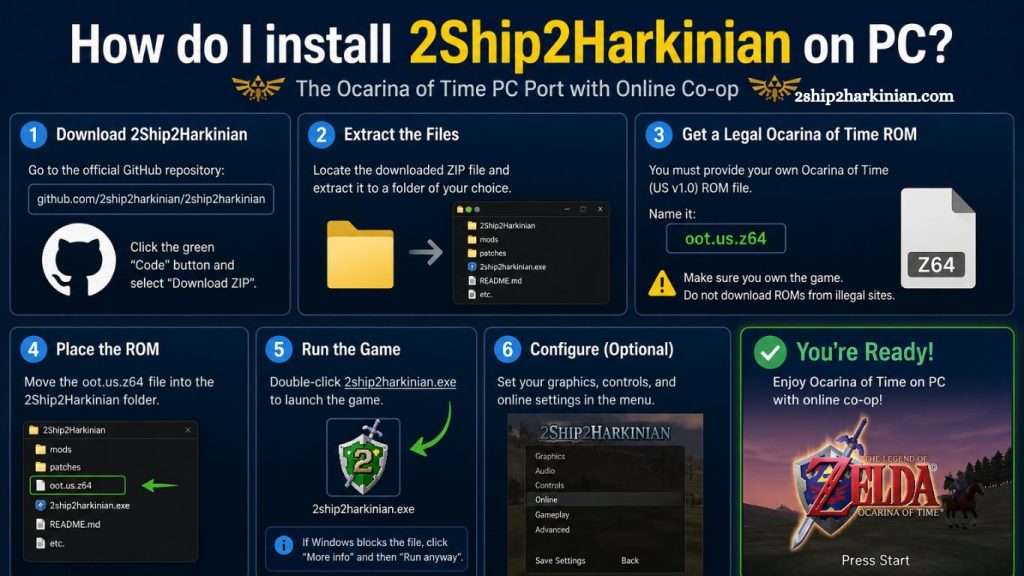
2Ship2Harkinian delivers a modern PC experience for classic gameplay, with improved performance, enhanced visuals, and quality-of-life upgrades. Proper installation ensures smooth gameplay, stable performance, and full feature access on Windows systems.
This guide explains the complete setup process, system preparation, file requirements, configuration steps, and troubleshooting methods. Each section focuses on clarity, performance optimization, and safe installation practices for PC users.
Understanding 2Ship2Harkinian for PC
2Ship2Harkinian functions as a community-driven PC port designed to modernize a classic console experience. It replaces outdated hardware limitations with a flexible engine optimized for modern operating systems.
Core advantages include:
- Higher frame rates compared to the original hardware
- Resolution scaling for modern displays
- Improved control support, including keyboard and controller mapping
- Expanded modding compatibility
- Reduced loading delays and smoother gameplay loops
Proper installation unlocks these enhancements while preserving the original gameplay structure.
Read More: 2Ship2Harkinian: Is It Free to Use?
System Requirements for Smooth Performance
Modern PCs can run the application easily, but stable performance depends on meeting recommended specifications.
Minimum requirements:
- Windows 10 or newer (64-bit)
- Dual-core processor or higher
- 4 GB RAM
- Integrated graphics with DirectX 11 support
- 500 MB available storage
Recommended configuration:
- Quad-core CPU or better
- 8 GB RAM or higher
- Dedicated GPU (NVIDIA or AMD)
- SSD storage for faster load times
A system meeting recommended standards ensures stable frame rates and reduced stutter during gameplay.
Preparing Your PC Before Installation
Preparation improves installation success and reduces errors during setup.
Key preparation steps:
- Update Windows to the latest version
- Install the latest GPU drivers from official vendor websites
- Disable unnecessary background applications
- Ensure antivirus software does not block installation files
- Create a dedicated folder for game installation
Organizing files before setup prevents confusion and simplifies troubleshooting later.
Downloading 2Ship2Harkinian Safely
Only download 2Ship2Harkinian from trusted community or official development sources. Unverified downloads may contain modified or unsafe files.
Recommended download approach:
- Visit the official release page or repository
- Select the latest stable version for Windows
- Download the compressed archive file (ZIP or similar format)
- Verify file integrity if a checksum is provided
Safe downloading protects system security and ensures correct program functionality.
Extracting Installation Files
After downloading, the extraction prepares the setup application.
Steps:
- Right-click the downloaded archive
- Select “Extract All” or use tools like WinRAR or 7-Zip
- Choose a clean destination folder (avoid system directories like Program Files)
- Confirm extraction completion without errors
Extracted files typically include executable files, configuration folders, and asset directories required for launch.
Setting Up Game Data Files
2Ship2Harkinian requires original game assets to function. These files must be legally obtained through personal ownership of the game.
Setup process:
- Use a legally owned copy of the original game
- Extract the required game data using the recommended tools from the official documentation
- Place extracted files into the designated “game data” or “assets” folder
- Ensure file structure matches instructions provided by the project
Correct file placement is critical for a successful startup and prevents missing-asset errors.
Running the First Launch
The initial launch configures system settings and creates the necessary directories.
Steps:
- Open the extracted folder
- Locate the main executable file
- Right-click and select “Run as Administrator.”
- Wait for the initial configuration to complete
- Allow the program to generate configuration files
The first launch may take longer than usual due to initialization.
Configuring Graphics and Performance Settings
Optimization ensures smooth gameplay across different hardware setups.
Recommended adjustments:
- Set the resolution to match the monitor display
- Enable full-screen mode for stability
- Adjust frame rate limit based on monitor refresh rate
- Enable V-Sync if screen tearing occurs
- Reduce shadows or effects on lower-end systems
Proper tuning improves responsiveness and reduces input lag.
Controller and Keyboard Setup
Flexible input support enhances gameplay experience.
Configuration steps:
- Open the input settings menu
- Select preferred input device (keyboard or controller)
- Map movement, camera, and action buttons
- Test controls in-game for accuracy
- Save configuration profile
Controllers generally provide a more authentic gameplay experience, especially for action-adventure mechanics.
Common Installation Issues and Fixes
Even properly installed setups may encounter minor issues. Most problems are easy to resolve.
Typical issues include:
Game not launching
- Install the latest Visual C++ Redistributables
- Run the application as an administrator
- Re-extract files if corruption occurs
Missing assets error
- Verify the correct placement of game data files
- Ensure original files are fully extracted
Low performance
- Update GPU drivers
- Lower graphical settings
- Close background applications
Controller not detected
- Reconnect device
- Check input settings
- Update controller drivers
Systematic troubleshooting resolves most startup problems quickly.
Performance Optimization Tips
Advanced adjustments improve long-term stability and responsiveness.
Optimization strategies:
- Enable high-performance power mode on laptops
- Keep GPU drivers updated regularly
- Disable overlays from third-party apps
- Store game files on SSD instead of HDD
- Maintain consistent frame rate caps
These improvements reduce lag spikes and enhance gameplay fluidity.
Updating 2Ship2Harkinian Safely
Regular updates improve stability, add features, and fix bugs.
Update method:
- Download the latest version from the official source
- Back up configuration files
- Replace old installation files with updated ones
- Launch and verify settings remain intact
Maintaining updated versions ensures compatibility with improvements and community enhancements.
Security and Best Practices
Safe installation protects both the system and user data.
Best practices:
- Avoid unofficial modified builds
- Scan downloaded files before extraction
- Keep antivirus software active
- Maintain backups of configuration files
- Download updates only from trusted sources
Security awareness prevents corrupted installations and performance issues.
Frequently Asked Questions
What is 2Ship2Harkinian?
2Ship2Harkinian is a fan-made PC port that modernizes a classic Nintendo 64 game with improved graphics and performance.
Is 2Ship2Harkinian free to download?
Yes, it is free to download from official community or development sources, but it requires the original game files to run.
Do I need the original game to install it?
Yes, legal ownership of the original game is required to provide the necessary game data files.
Can I run 2Ship2Harkinian on a low-end PC?
Yes, it can run on low-end systems, but performance improves significantly with a dedicated GPU and more RAM.
Why is the game not launching after installation?
This usually happens due to missing dependencies, corrupted files, or incorrect placement of game data.
Does 2Ship2Harkinian support controllers?
Yes, it supports most modern controllers along with full keyboard and mouse configuration options.
How do I update 2Ship2Harkinian safely?
Download the latest version from the official source, back up your settings, and carefully replace the old installation files.
Conclusion
Installing 2Ship2Harkinian on PC provides a smoother, visually enhanced, and more customizable gaming experience. Following the correct installation process ensures stable performance, proper file setup, and improved gameplay on modern hardware. Regular updates, optimized settings, and safe downloads help maintain long-term performance while unlocking the full potential of this fan-made PC port.