
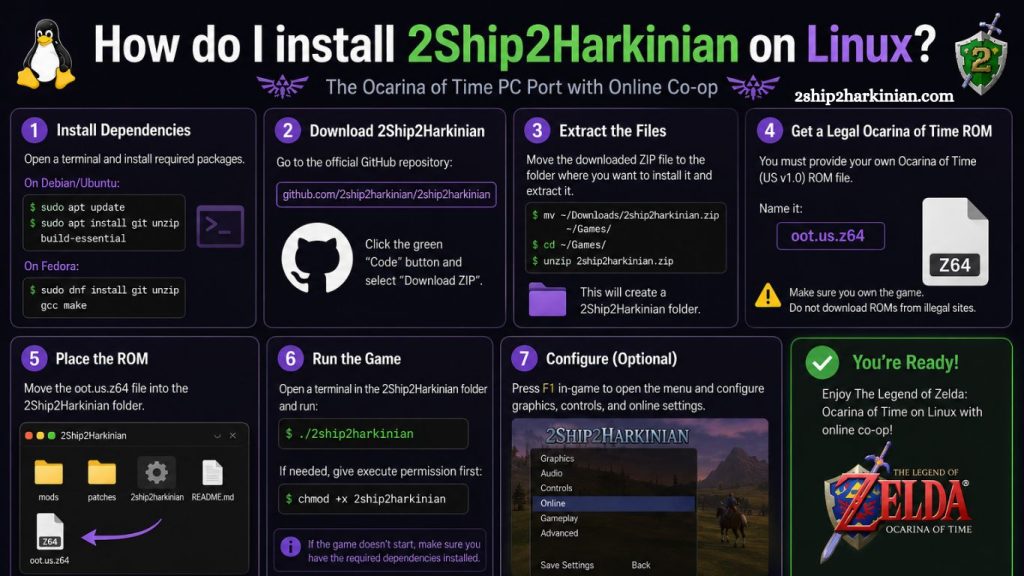
Linux gamers continue searching for better ways to enjoy classic titles with modern enhancements. 2Ship2Harkinian delivers exactly that experience by bringing improved performance, widescreen support, customizable controls, and advanced gameplay features to Linux systems. Players who enjoy retro gaming often choose this project because it transforms the original adventure into a smoother and more optimized PC experience.
Installing 2Ship2Harkinian on Linux may appear challenging for beginners, but the process becomes simple with proper guidance. This tutorial explains every step clearly, helping users install, configure, and launch the game successfully on popular Linux distributions.
What Is 2Ship2Harkinian?
2Ship2Harkinian represents a Linux-compatible port designed to modernize a beloved classic adventure game. Developers created this project to improve graphics, frame rates, controller support, and gameplay customization without relying on traditional emulation.
Unlike standard emulators, this port runs natively on Linux hardware. Native execution improves stability, reduces input lag, and delivers smoother gameplay. Linux users can also enjoy enhanced modding support and graphical upgrades not available on the original hardware.
Read More: Set Up 2Ship2Harkinian on Windows PC Quickly and Safely
Key features include:
- Native Linux support
- HD resolutions
- Widescreen gameplay
- Higher frame rates
- Controller compatibility
- Custom texture support
- Save state improvements
- Enhanced performance settings
Gamers using Ubuntu, Fedora, Arch Linux, or Debian can install 2Ship2Harkinian with minimal system requirements.
System Requirements for 2Ship2Harkinian on Linux
Checking hardware compatibility before installation prevents common performance problems later.
- Minimum Requirements
- 64-bit Linux distribution
- Dual-core processor
- 4 GB RAM
- OpenGL-compatible graphics card
- SDL2 support
- Vulkan drivers recommended
- Recommended Requirements
- Quad-core processor
- 8 GB RAM
- Dedicated GPU
- Updated Mesa drivers
- Game controller support
Modern Linux distributions already include most required dependencies, making installation faster.
Prepare Linux System Before Installation
Updating Linux packages ensures compatibility with current libraries and development tools.
Run these commands before starting installation:
sudo apt update && sudo apt upgradeUbuntu and Debian users should also install essential build packages:
sudo apt install git cmake build-essential libsdl2-devFedora users can install dependencies using:
sudo dnf install git cmake SDL2-devel gcc-c++Arch Linux users should run:
sudo pacman -S git cmake sdl2 base-develUpdated packages reduce compilation errors and improve runtime stability.
Build 2Ship2Harkinian on Linux
Compilation converts source files into executable Linux binaries. Modern processors complete this process quickly.
Create a build directory:
mkdir build
cd build
Generate project files using CMake:
cmake ..Compile the project:
make -j$(nproc)Linux automatically uses available CPU threads for faster compilation.
Successful compilation creates executable files inside the build folder.
Add Required Game ROM Files
2Ship2Harkinian requires a legally obtained game ROM from an original cartridge. Users must provide their own backup files to complete setup.
Copy the ROM file into the correct game directory. Most installations use a folder similar to:
~/.local/share/2ship2harkinianEnsure the ROM matches supported game versions. Incorrect ROM formats may prevent startup or trigger crashes.
Valid ROM verification remains essential for successful gameplay.
Launch 2Ship2Harkinian on Linux
Start the game directly from the build directory:
./2ship2harkinianLinux launches the application and automatically generates configuration files during first startup.
Players can now customize:
- Resolution
- Frame rate
- Audio settings
- Graphics enhancements
- Controller mappings
- Texture packs
Native Linux rendering significantly improves gameplay smoothness compared to older emulation methods.
Configure Graphics Settings
Optimized graphics settings improve performance and visual quality across different Linux systems.
- Recommended Display Settings
- Resolution: Native monitor resolution
- Frame Rate: 60 FPS
- Anti-Aliasing: Enabled
- V-Sync: Optional
- Widescreen Mode: Enabled
Integrated GPUs may require lower rendering settings for stable gameplay.
Dedicated graphics cards from NVIDIA or AMD deliver better visual performance with higher frame rates.
Enable Controller Support
2Ship2Harkinian supports most USB and Bluetooth controllers on Linux.
Compatible devices include:
- Xbox controllers
- PlayStation controllers
- Nintendo Switch Pro controllers
- Generic USB gamepads
Linux usually detects controllers automatically. Players can configure button layouts inside the settings menu.
Steam Input compatibility also improves controller customization for advanced users.
Install 2Ship2Harkinian on Steam Deck
Steam Deck users can also install 2Ship2Harkinian using Desktop Mode.
- Steam Deck Installation Steps
- Switch to Desktop Mode
- Open Konsole terminal
- Install dependencies
- Clone GitHub repository
- Compile source files
- Add executable to Steam library
Steam Deck hardware runs the game smoothly with optimized Linux compatibility.
Portable gameplay combined with enhanced graphics creates an excellent retro gaming experience.
Best Linux Distributions for 2Ship2Harkinian
Several Linux distributions provide excellent gaming performance.
Ubuntu
Ubuntu remains beginner-friendly and offers wide driver compatibility.
Pop!_OS
Pop!_OS includes gaming-focused optimizations and updated graphics drivers.
Arch Linux
Arch delivers cutting-edge packages and strong gaming performance for advanced users.
Fedora
Fedora balances stability with modern Linux gaming support.
Choosing a gaming-focused Linux distribution improves overall compatibility and performance.
Security Tips for Linux Game Installations
Downloading source files from trusted repositories protects Linux systems from malware or corrupted packages.
Important security practices include:
- Download only from official GitHub repositories
- Avoid unofficial ROM downloads
- Keep Linux packages updated
- Use trusted GPU drivers
- Verify repository authenticity
Safe installation habits prevent software conflicts and security risks.
Advantages of Running 2Ship2Harkinian Natively on Linux
Native Linux gaming continues gaining popularity because it delivers better resource management and system efficiency.
Major advantages include:
- Lower input latency
- Better frame pacing
- Reduced CPU overhead
- Improved modding support
- Enhanced graphics customization
- Faster loading times
Linux users increasingly prefer native ports over traditional emulators for retro gaming projects.
Frequently Asked Questions
Can Ubuntu run 2Ship2Harkinian successfully?
Yes, Ubuntu supports 2Ship2Harkinian smoothly when required dependencies, SDL2 libraries, and updated graphics drivers are installed correctly.
Does 2Ship2Harkinian work on Steam Deck?
Yes, Steam Deck runs 2Ship2Harkinian through Desktop Mode using Linux-based SteamOS with excellent gameplay performance and controller support.
Which Linux distributions support 2Ship2Harkinian?
Ubuntu, Fedora, Arch Linux, Debian, and Pop!_OS support 2Ship2Harkinian with proper dependencies and updated GPU drivers installed.
Why does 2Ship2Harkinian show a black screen on Linux?
Black screen issues usually happen because of unsupported ROM versions, outdated GPU drivers, or missing Vulkan support libraries.
Do Linux users need Vulkan support for 2Ship2Harkinian?
Vulkan support improves rendering performance, frame pacing, and overall gameplay stability, especially on modern Linux gaming systems.
Can controllers work with 2Ship2Harkinian on Linux?
Yes, Xbox, PlayStation, Nintendo Switch Pro, and generic USB controllers work properly with customizable button mapping support.
Is compiling 2Ship2Harkinian on Linux difficult?
Compilation remains simple when users install required dependencies, follow terminal commands carefully, and use updated Linux packages.
Conclusion
Installing 2Ship2Harkinian on Linux provides a powerful way to enjoy enhanced retro gaming with modern performance improvements, widescreen support, and advanced customization features. Linux users can complete the setup process smoothly by installing required dependencies, compiling source files correctly, and configuring supported ROM files.